What am I really invested in?
Your holdings consolidated across accounts, then opened up: the companies inside each fund, the sectors and themes they add up to, and the exposure you hold without ever having bought it directly.
See what it includesTwenty-five tabs of analysis from one brokerage statement, grouped here much as they are grouped in the app. Where a figure rests on a reference table, the size of that table is stated beside it.
Start with the questions that matter. The exact figures, and the limits of each one, are a click away underneath.
Your holdings consolidated across accounts, then opened up: the companies inside each fund, the sectors and themes they add up to, and the exposure you hold without ever having bought it directly.
See what it includesSeven one-click shocks and seven macro sliders, your own concentration limits, how much your funds duplicate each other, and how your largest names tend to move together.
See what it includesRetirement year by year with federal and state tax, a thousand simulated market histories, college costs per child, and the spending plan behind all of it.
See what it includesTrailing returns against six benchmarks, dividend income and yield, and what your funds take in fees each year — in dollars, with cheaper equivalents named where they exist.
See what it includesRoth conversion to a bracket you choose, losses worth harvesting, shares worth giving rather than selling, and what a purchase would do to your mix before you make it.
See what it includesA written summary drawn from the same figures as the tabs, and a PDF that carries each section’s own caveats rather than leaving them behind on the screen.
See what it includesOpen the demo portfolio with no account, or sign up to use your own statement. Five of the twenty-five tabs stay open on the demo without signing up, and they are the ones that answer “what am I actually holding”.
| Capability | No accountdemo portfolio | Full planafter beta |
|---|---|---|
| Overview, Sectors Exposure, Company Exposure and Themes | ✓ | ✓ |
| Reallocation — your mix against a target | ✓ | ✓ |
| Ledger, Performance, Ratings, Income and Fee Drag | — | ✓ |
| Stress Test, Thresholds, Overlap and Correlation | — | ✓ |
| Retirement, College, Roth, Tax-Loss, Donate, Pre-Buy | — | ✓ |
| Monte Carlo, Goal Calc and Projection | — | ✓ |
| Options tracking, Summary Insights, the PDF and saved plans | — | ✓ |
Some tools need figures from you — a retirement plan cannot project without an age and a spending number. Coverage and limits are stated inside each tool, on screen.
Twenty-five tabs of analysis from one statement file, grouped here much as they are grouped in the app — so what convinces you now is where you will find it afterwards.
Where the limits are, they are in the text. Coverage, the size of a reference table, and what a tool needs from you are stated beside the claim rather than collected in small print.
Each client gets the same depth of analysis, kept apart from the others, under a single adviser login — with no charge per household. At fifty households, a $1,188 seat works out at $23.76 of seat cost per household a year. That is arithmetic on the seat fee, not a per-client rate.
Illustration of the client switcher — not a product screenshot.
The brokerage file is read in your browser and is not uploaded. Nobody here receives the document you exported.
The positions and their values are kept under your email address so the report is there when you come back, along with your saved plans. The privacy policy sets out the rest, including what an administrator can open and what that records.
A fund it cannot look through, a return window with no source, a position with no cost basis — each is reported as missing rather than counted as zero or as full coverage.
If a plan lapses, what you have stored is not deleted. The analysis pauses and comes back when the plan does.
Accounts opened now are not being charged. The prices on this page are what it will cost when beta ends, and you will get an email before anything changes on your account. There is no end date announced, and no promise that a beta account stays free afterwards.
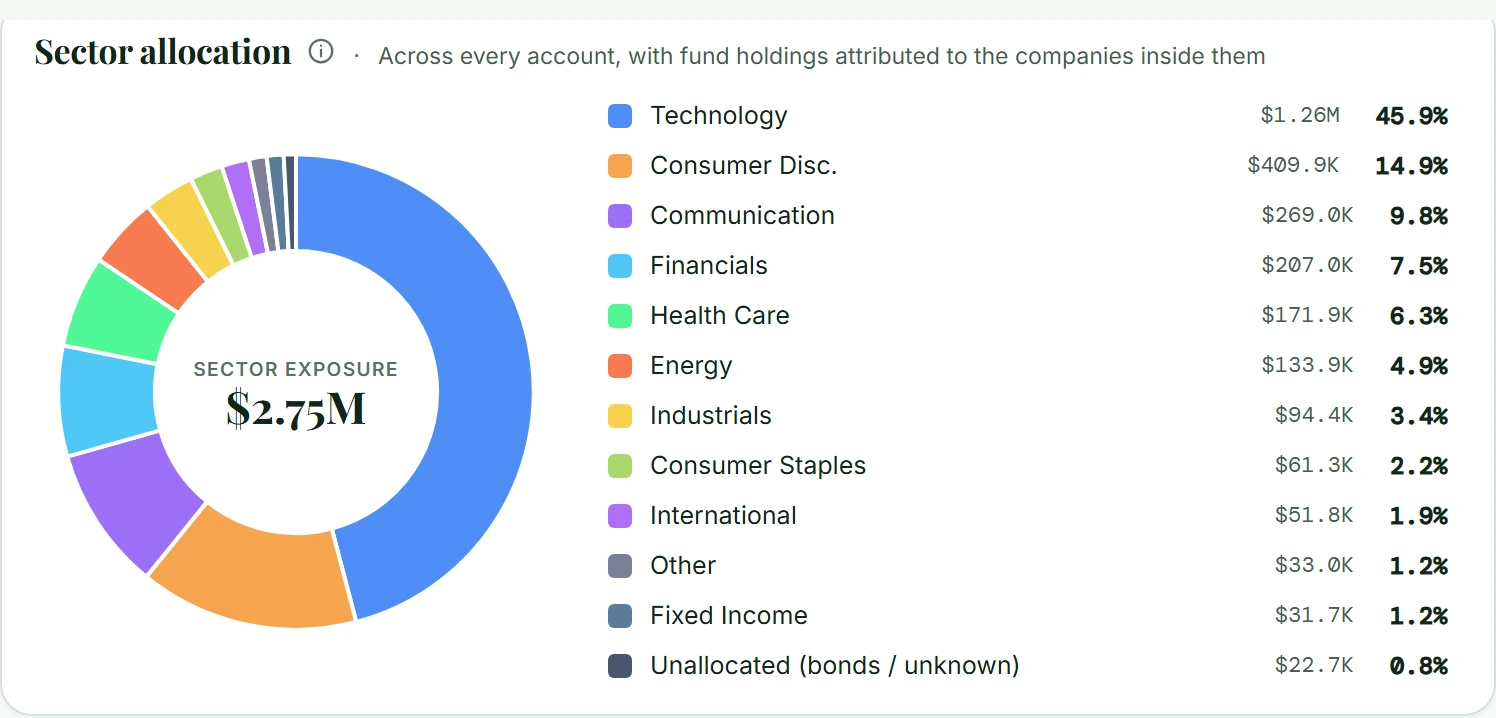
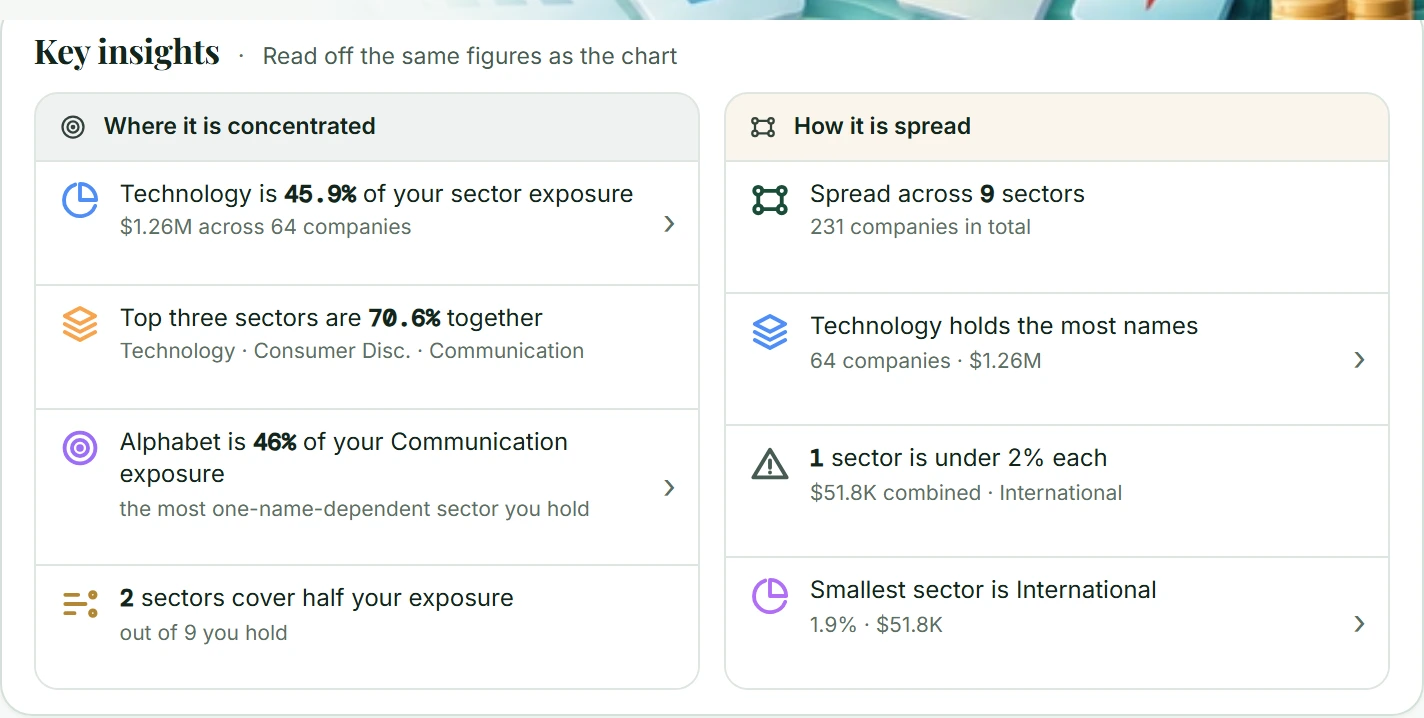
Five of the twenty-five tabs: Overview, Sectors Exposure, Thematic Exposure, Company Exposure and Reallocation — on the demo portfolio. Those are the ones that answer “what am I actually holding”.
Reading your own statement needs an account, and opens Overview and Sectors Exposure on it. Everything else — the ledger and returns, income and fees, the risk tabs, all the planning work, the outlook projections, options tracking, the written summary and the PDF — needs a plan.
Yes. A couple is one household, and the retirement planner models two lives, including what changes for the survivor.
A seat is one login with its own client book, at $99 a month, billed $1,188 a year. There is no charge per client, so a seat carrying forty households costs the same as one carrying four. A seat holds up to 500 active client households; archived clients do not count toward that, and if you need more, write to us.
A seat is not a firm-wide login. Four advisers who each want their own book is four seats, and they can be invoiced together.
No. The file is read in your browser. What is stored is the parsed holdings — the positions it read, with their values, cost basis and account labels — under your email address, so your report and plans are there on another device. Each time a portfolio is opened, the app also sends the ticker symbols it found to our server on its own, without quantities or values, so they can be classified and priced; the server keeps a list of those symbols with no account attached. A fund it does not recognise is looked up from public SEC filings, and the description printed beside it is sent too, with dollar amounts and long digit strings removed. The privacy policy sets out each case.
No. There is no card form and no checkout. To start a plan, or ask about several seats, email hello@tulir.systems and we will confirm the price in writing first.
No, and it is not built to. It shows what you hold, what it is exposed to, what it costs and how it behaves under assumptions you can see and change. Nothing in it is a recommendation to buy, sell or hold any security, and it is not investment, tax or legal advice.
Open the demo and look, then sign up to bring in your own export. The demo needs no account, and nothing is charged during beta.